

Q3 Form 941 Filing Season is Here: What’s New in TaxBandits?
reading time: 12 minute(s)

The Q3 2026 Form 941 filing season is now underway, with the filing deadline set for November 2, 2026. For many businesses and tax professionals, quarterly payroll tax filing involves more than completing a form. It requires collecting payroll data, checking tax amounts, reviewing return details, communicating with clients, and filing accurately before the deadline.
This quarter, TaxBandits is rolling out Bulk 941 Entry, a new way to prepare multiple returns from one screen. A few other tools that launched earlier this year, Smart Upload, customizable client letters, and refund bank details, are also worth a second look if you haven’t tried them yet.
1. Bulk Entry: Prepare Multiple 941s at Once
Bulk 941 Entry is a spreadsheet-style workspace where you can prepare Form 941 for several employers at once instead of opening, completing, and closing one return at a time.
Picture a firm handling 941s for 40 clients this quarter. With Bulk Entry, you pick the filing quarter, then add or select the employers you’re filing for. Every employer becomes a row in the grid, and you can:
- Add the specific columns your return needs, instead of scrolling through fields you don’t use
- Mark zero reporting for eligible returns in bulk, rather than one return at a time
- Set deposit schedules and payment options directly in the grid, applying the same choice across employers where it applies
Once the details are in, you run an audit across the whole batch. Returns that pass are ready to review and transmit; anything flagged gets fixed right in the grid before you try again.
2. Smart Upload: Import Payroll Data with Ease
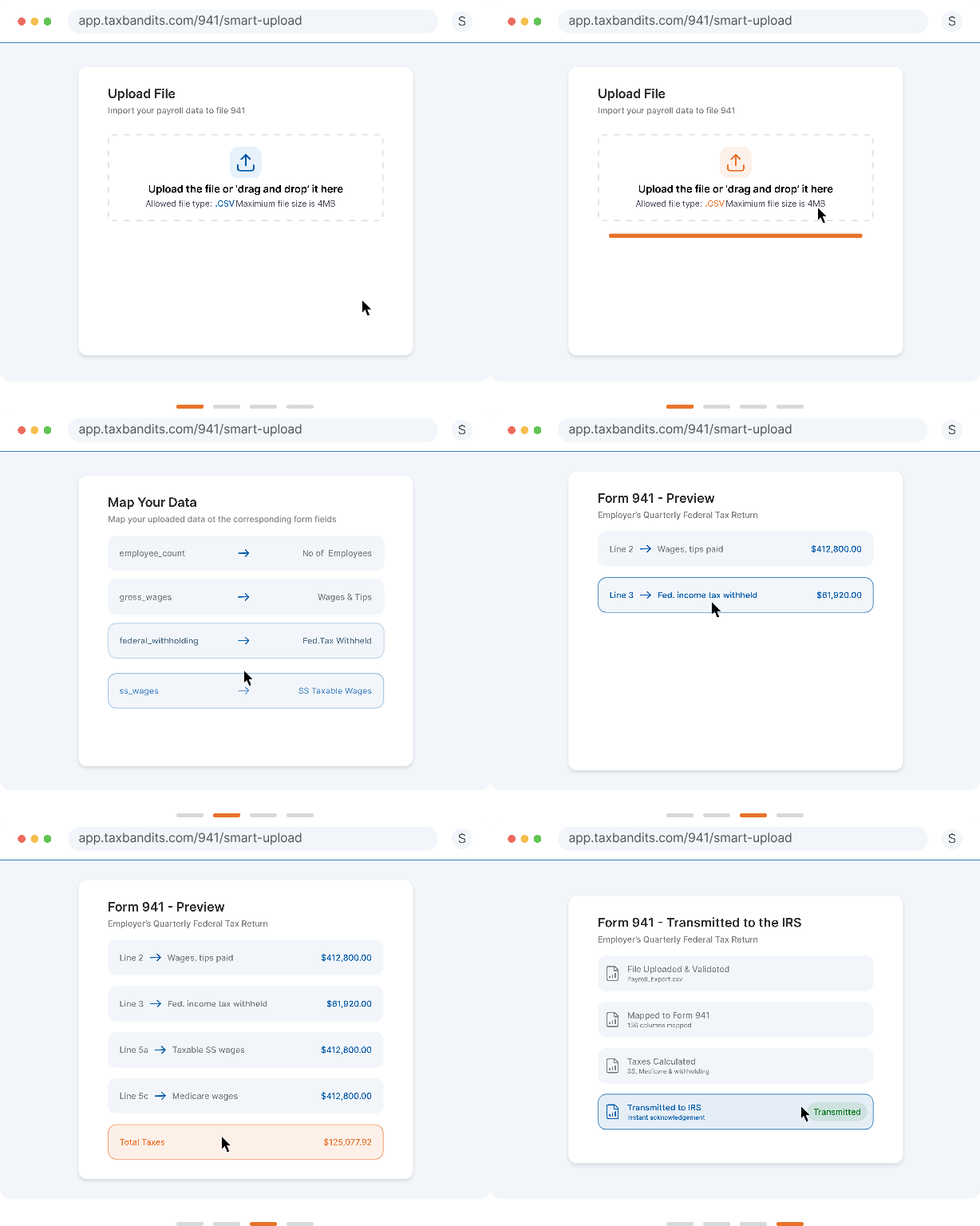
Most of the friction in preparing Form 941 doesn’t come from missing data. It comes from data that’s in the wrong shape, sitting in payroll software, an ERP system, or a spreadsheet that doesn’t match what a filing platform expects.
Smart Upload skips the reformatting step. You upload your own CSV, whatever columns it already has, and TaxBandits’ Form Bridge API maps those columns to the correct Form 941 fields automatically.
This tends to help:
- Employers switching over from another Form 941 provider
- Businesses using payroll or ERP systems that don’t support Form 941 e-filing directly
- Tax professionals juggling client files that all arrive in different formats
Once the file is uploaded, TaxBandits uses AI to intelligently map columns from the user’s own template to the corresponding Form 941 fields.
3. Customized Client Letter for Tax Professionals
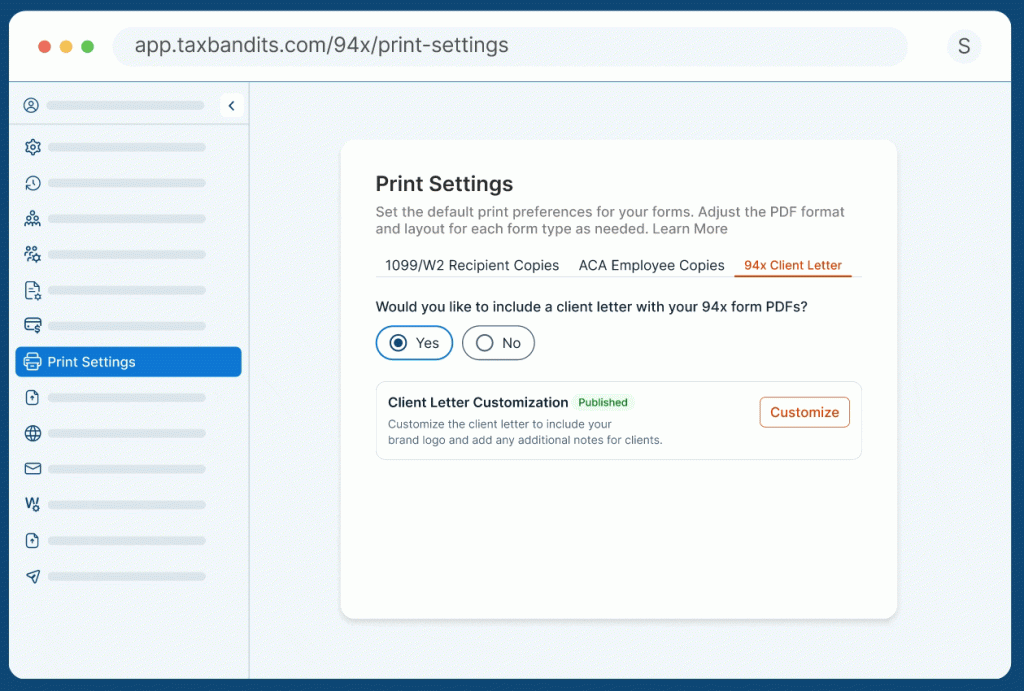
Clients often expect documentation after their payroll tax returns are prepared or filed. Sending only a form PDF may provide the required information, but it may not reflect the firm’s professionalism or brand.
TaxBandits now offers enhanced Client Letter Customization for 94x form PDFs.
With this feature, tax professionals can attach personalized cover letters when sharing 94x form PDFs with clients. This helps firms provide a more polished document package and maintain consistent communication.
A customized client letter can be used to include filing details, firm information, next steps, or a short confirmation message. It also helps reinforce the firm’s branding when communicating with clients. Learn more
4. Get Bank Information From Clients for Refunds
With the updated Form 941 for 2026, employers who are eligible for a refund can now provide bank account information on the return and receive their refund through direct deposit.
To help tax professionals collect this information efficiently, TaxBandits now provides two simple options:
- Request bank information securely through the Client Portal.
- Collect bank information as part of the e-signature request workflow.
A better workflow for the Q3 941 season
The latest TaxBandits updates are designed to solve practical filing challenges during the Q3 941 season. Together, these enhancements help businesses and tax professionals prepare, review, and e-file Form 941 more efficiently.
Whether you are filing for your own business or managing quarterly payroll tax filings for multiple clients, TaxBandits gives you the tools to simplify the process from one secure, centralized platform.
Start your Q3 Form 941 filing with TaxBandits and manage your payroll tax filing workflow with greater accuracy, organization, and confidence.
Leave a Comment