

Everything You Need to Know About Schedule B (Form 941)
reading time: 17 minute(s)
If you’re filing Form 941, you may have come across Schedule B (Form 941) and wondered what it’s for—or whether you even need to file it. Don’t worry, you’re not alone! At first glance, Schedule B can look intimidating, but once you understand its purpose, it’s actually pretty straightforward.
Let’s break it down step by step.
What Is Schedule B on Form 941?
Schedule B (Form 941) is officially called the Report of Tax Liability for Semiweekly Schedule Depositors. If you deposit your payroll taxes with the IRS on a semiweekly basis, you must complete and attach Schedule B to your tax Form 941.
For employers with a larger payroll, understanding how Schedule B fits into your filing process is crucial. The form serves as a tool to report your payroll tax liability for each day of the quarter. It ensures the IRS can verify your deposits against your reported liabilities.
Why Is Schedule B Important?
For employers who deposit taxes semiweekly, Schedule B acts as a record of their daily tax liabilities, ensuring that the IRS receives the correct amounts in a timely manner. The IRS uses this schedule to track whether deposits are made according to the correct schedule and whether they align with reported liabilities.
Who Needs to Complete Schedule B (Form 941)?
Not every employer will need to complete Form 941 Schedule B. The IRS assigns deposit schedules based on the size of your business and the amount of taxes you owe. Specifically, employers are classified as semiweekly or monthly depositors based on a lookback period.
Not sure whether you’re a semiweekly depositor? Let’s look at how the IRS decides that.
Who Is a Semiweekly Depositor?
The IRS determines your deposit schedule based on your lookback period. For example, for a 2025 Form 941 filer, the lookback period is July 1, 2023, through June 30, 2024.
You are generally considered a semiweekly depositor if either of the following applies:
- You reported more than $50,000 in employment taxes during the lookback period, or
- You accumulated a $100,000 tax liability on any single day during the current or previous calendar year
The $100,000 Rule: Next-Day Deposit Rule
No matter whether you’re a monthly or semiweekly depositor, if your tax liability reaches $100,000 or more on any day, you must deposit it the next business day. This is known as the Next-Day Deposit Rule, and it automatically makes you a semiweekly depositor for the rest of the year and the following year.
Understanding the Layout of 941 Schedule B
Your first thought might be: “That’s a lot of boxes!” And yes—you’re not wrong. But 941 Schedule B is easier than it looks once you know what goes where.
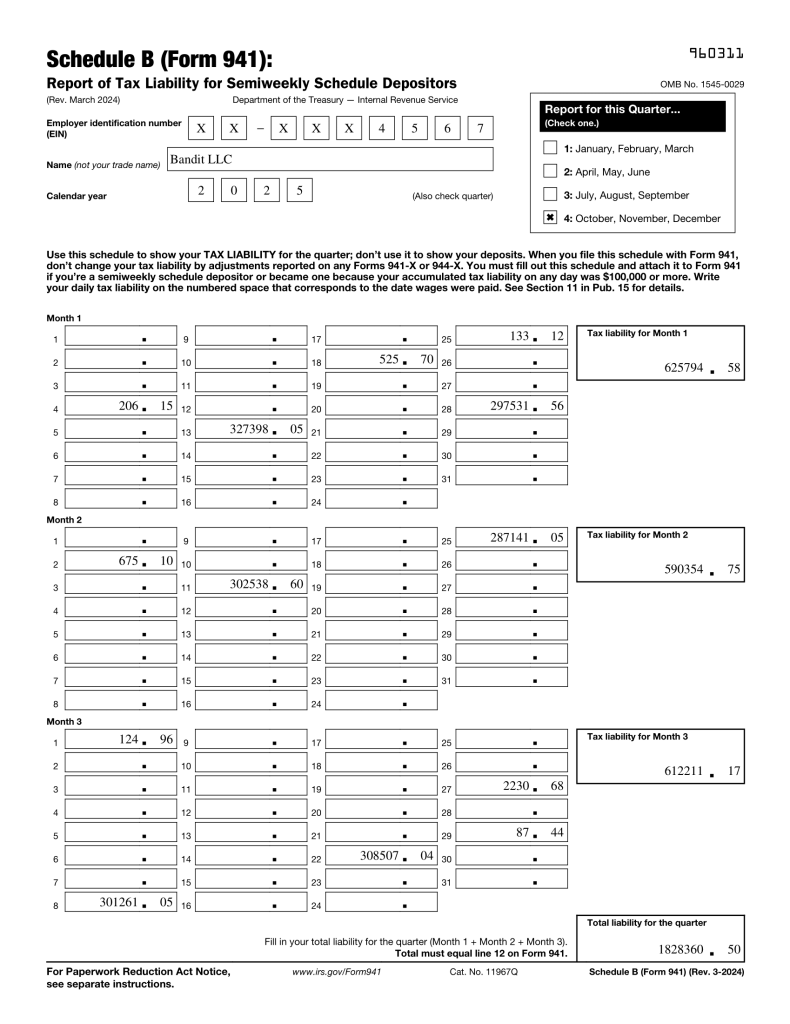
Here’s what you’ll need to complete it:
- Employer Identification Number (EIN): The EIN is used to identify your business, and it should match the EIN on your Form 941 and IRS records.
- Quarter and Calendar Year: Indicate the period you’re filing for. Form 941 is filed on a quarterly basis, so make sure to select the correct quarter and year.
- Daily Tax Liability Boxes: There are boxes for each day of the quarter where you report your tax liability, not your tax deposits. These are the amounts you owe based on the wages you paid employees that day. For example, if you paid employees on April 1st, the tax liability for that day is reported in the April 1st box.
- Monthly Totals: After reporting the daily liabilities, add up the daily amounts for each month of the quarter. This will be your monthly tax liability.
- Quarterly Total: At the end of the form, add up the monthly totals to get your quarterly total, which should match Line 12 on Form 941.
The IRS Compliance Check
One of the key points to remember when completing Schedule B is that the total tax liability on Schedule B must exactly match Line 12 on Form 941. The IRS uses this cross-check to ensure that the amounts you report for the quarter are consistent with your tax deposits. Any discrepancies between these two numbers could trigger an IRS audit or penalties for incorrect filings
How Do I Determine My Tax Liability?
Your tax liability comes from the wages you pay your employees and includes:
- Federal income tax withheld from employee wages.
- Employee and employer shares of Social Security tax.
- Employee and employer shares of Medicare tax.
These amounts are calculated based on each payroll run—not when you make deposits. It’s crucial to report them on Schedule B on the day the wages were paid, not on the deposit date.
For example, if you pay employees on April 1st, you will report the tax liability for that day on the April 1st box of Schedule B, even if you deposit the taxes a few days later.
Additional Notes on Deposits
- Semiweekly Depositors: Your deposits are due on Wednesdays and Fridays, depending on when your payroll was paid.
- Monthly Depositors: Your deposits are generally due on the 15th of the following month.
This distinction is essential for staying in compliance and avoiding penalties.
Does TaxBandits Support Schedule B?
Absolutely! TaxBandits fully supports Schedule B and includes it as part of the Form 941 filing process. Here’s how we make it easier for you to file accurately:
- Step-by-Step Guidance: Our software walks you through each section of Schedule B, so you know exactly what to fill in and where.
- Built-In Error Checks: TaxBandits automatically checks your entries for common mistakes, helping you avoid common errors such as miscalculating your tax liability or mismatching totals.
- Secure Electronic Filing: With TaxBandits, you can e-file your Form 941 and Schedule B with confidence. Our platform is IRS-authorized and ensures that your returns are filed correctly and on time.
- Live Support: If you have any questions or get stuck, our U.S.-based support team is ready to assist you. Whether you need help via phone, email, or live chat, we are here to support you every step of the way.
File with Confidence–Backed by The Bandit Commitment
Filing Form 941 and Schedule B may seem like a daunting task, especially if you’re unfamiliar with the process. However, with the right knowledge and resources, you can handle it with ease. By understanding your responsibilities as a semiweekly depositor and knowing how to complete Schedule B correctly, you can ensure that your filings are accurate, timely, and fully compliant with IRS requirements.
And with TaxBandits by your side, you can streamline the entire process—making it simpler, faster, and error-free.
Leave a Comment