

reading time: 18 minute(s)
Filing business taxes can feel overwhelming — deadlines, paperwork, and all those numbers can really pile up. Sometimes, no matter how organized you are, you just need a little extra time to get everything right.
That’s where IRS Form 7004 comes to the rescue.
This form lets you secure an automatic extension to file your business tax return, so you can prepare your documents carefully without the stress of rushing. In this guide, we’ll break down Form 7004 in simple, easy-to-follow steps, so you can stay on top of deadlines, avoid penalties, and tackle tax season with confidence — without the last-minute scramble.
What Is IRS Form 7004?
Form 7004, the Application for Automatic Extension of Time to File Certain Business Income Tax, Information, and Other Returns, lets businesses request extra time—usually 6 months—to file their federal tax returns.
This form is used by corporations, partnerships, multi-member LLCs, estates, and trusts that need more time to prepare accurate returns. Keep in mind, Form 7004 only extends the time to file; it does not extend the time to pay any taxes owed. To avoid penalties or interest, businesses should estimate their tax liability and make any required payments by the original due date.
What’s New for Tax Year 2025:
For tax year 2025, filers requesting an extension for Forms 708, 8924, and 8928 must submit Form 7004 by paper. Electronic filing is not available for these forms this year. The IRS has announced that e-filing will be supported starting in tax year 2026.
Who Must File Form 7004?
IRS Form 7004 is designed for a wide range of business entities that need extra time to file their federal tax returns. Common users include:
- Corporations filing Form 1120
- S Corporations filing Form 1120-S
- Partnerships filing Form 1065
- Certain trusts, estates, and tax-exempt organizations
Because the form covers multiple return types, you’ll need to select the correct code that matches the return type of your business files.
When Is the Due Date for Filing Form 7004?
Filing Form 7004 on time is critical. The extension request must be submitted on or before the original due date of your business tax return.
Here are the most common deadlines:
- C Corporations (Form 1120): April 15 (for calendar-year filers)
- S Corporations (Form 1120-S): March 15
- Partnerships (Form 1065): March 15
- Certain trusts and estates: April 15
If the deadline falls on a weekend or federal holiday, it moves to the next business day.
Click here to learn more about Form 7004 due date.
| Note: Missing the deadline means the extension may not be valid, and late-filing penalties could apply. Filing early helps avoid last-minute issues. |
How to Complete Form 7004?
Filling out Form 7004 is not complicated, but each line matters. Here’s a simple breakdown of what each step means and where to enter the information on the form.
Enter Your Basic Business Information (Top Section of Form)
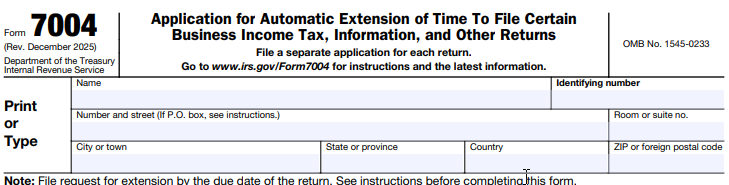
At the top of Form 7004, enter:
- Name: Your legal business name
- Address: Your business mailing address
- Identification Number: Your EIN or SSN
This section does not have line numbers, but it must match IRS records exactly. Even small differences — like using a trade name instead of the legal name — can cause delays or rejection.
Part I—Automatic Extension for Certain Business Income Tax, Information, and Other Returns
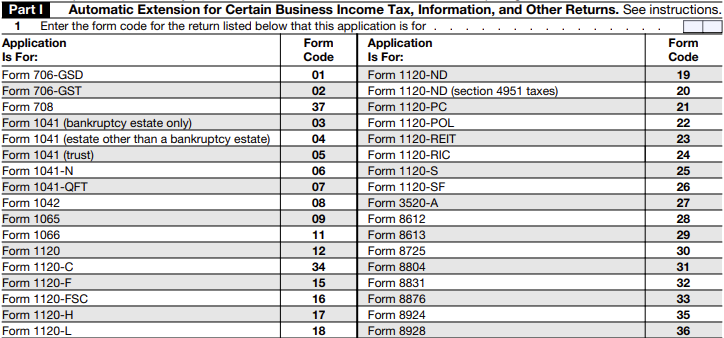
Line 1 is where you enter the form code for the return for which you are requesting an extension.
Each return type (such as Form 1065, 1120-S, or 1120) has a specific code listed in the official IRS Form 7004 instructions. Entering the correct code ensures your extension is applied to the right tax return.
Choosing the wrong code may cause processing delays or rejection.
Part II—All Filers Must Complete This Part
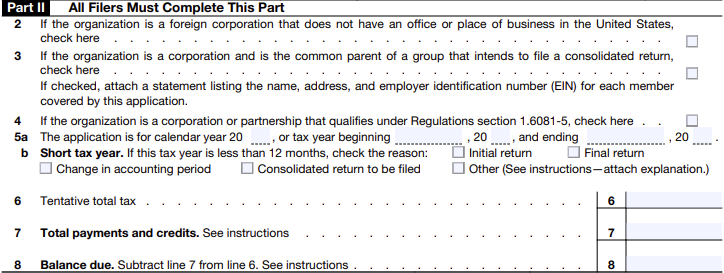
- Line 2: Foreign Corporation Without U.S. Office: If your organization is a foreign corporation without an office or place of business in the U.S., check the first box.
- Line 3: Consolidated Return Parent: If your organization is a corporation and the common parent of a group filing a consolidated return, check the second box.
- Line 4: Corporation or Partnership Eligible Under Reg. 1.6081-5: If your organization qualifies under this regulation 1.6081-5, check this box.
- Line 5a: Indicate whether your return is for the calendar year or a fiscal year:
- Calendar year: check the box for the year (e.g., 2025).
- Fiscal year: enter the beginning and ending dates of the tax year.
- Line 5b: Used only if your business has a short tax year (less than 12 months).
- If this applies:
- Check the box on Line 5b
- Enter the beginning and ending dates of your short tax year
- If your business operates on a regular 12-month tax year, leave Line 5b blank.
- If this applies:
- Line 6 – Tentative Total Tax: Here, you enter your estimated total tax liability for the year. Even though your full return is not ready, the IRS expects a reasonable estimate based on current income and expense records. The estimate does not need to be exact, but it should be as accurate as possible.
- Line 7 – Total Payments and Credits: List all payments your business has already made toward this year’s taxes, including:
- Quarterly estimated tax payments
- Overpayments applied from a previous year
- Any available tax credits
- These amounts reduce your remaining balance.
- Line 8 – Balance Due: Subtract Line 7 from Line 6. If the result is more than zero, this is the amount of tax you still owe. You should pay this when filing Form 7004 to reduce penalties and interest.
How to E-File Form 7004 with TaxBandits?
Filing your business tax extension online with TaxBandits is quick and straightforward. Here’s a simplified overview of the process:
- Sign in to your TaxBandits account.
- Select Form 7004 from the federal extension options.
- Enter your business information and choose the return you want to extend.
- Provide the required tax year and tax estimate details.
- Review your form, correct any errors, and proceed.
- Pay and transmit your extension request to the IRS.
After filing, you can track the status of your extension directly from your dashboard. Once accepted, the IRS grants an automatic extension—generally 6 additional months to file your return (but not to pay any taxes due).
For detailed, step-by-step guidance, click here.
File Your Extension the Easy Way with TaxBandits
Missed the rush? No worries — future filing deadlines are always ahead. TaxBandits is here to make your next Form 7004 extension smooth and stress-free.
With built-in error checks, instant IRS acknowledgments, and dashboard tracking, TaxBandits helps you file accurately and on time—without the last-minute rush. E-file your Form 7004 with TaxBandits today and give your business the extra time it needs to file with confidence.
Leave a Comment