

reading time: 15 minute(s)
A little preparation goes a long way when it comes to 1099 and W‑2 filings. Taking the time to organize your information and follow a consistent process can significantly reduce errors and prevent last-minute stress.
Even small mistakes, like a typo in a name or TIN, can lead to delays or rejections, so starting thoughtfully sets the stage for a smooth filing season.
Equally important is focusing on the right checks. Reviewing your data carefully, confirming information, and running simple validations can help catch potential issues before they become problems.
With that, let’s walk through the essential steps for error-free filings.
Start With Clean, Complete Data
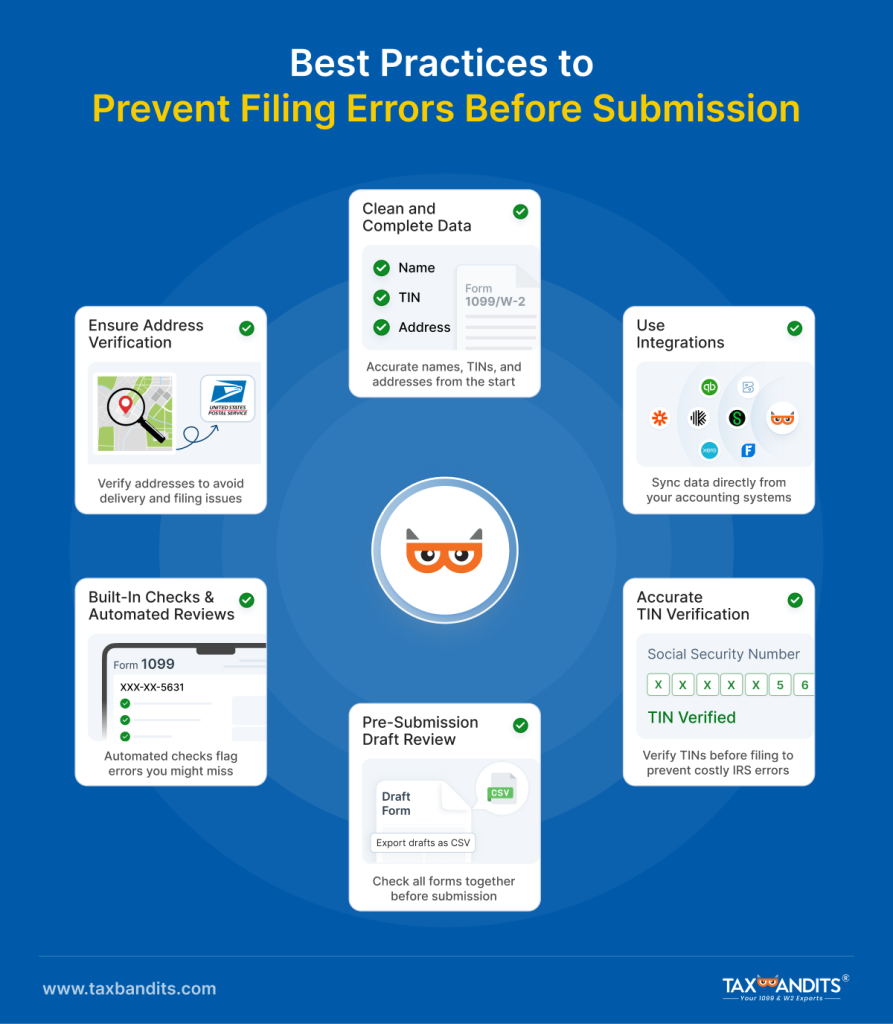
Ensuring the information you collect from payees to employees is accurate is the foundation of a smooth filing process. Before you prepare a 1099 or W‑2, confirm names, addresses, and Tax Identification Numbers (TINs) are correct and up to date. Manual entry increases the risk of typos and mismatches, especially when working with large datasets or multiple clients.
TaxBandits helps by offering bulk data import options like standard CSV templates, integration options, and direct copy and paste fields that reduce manual entry altogether. These import resources help you prepare data offline and bring it into the platform, minimizing the risk of human error before you even begin filing.
Use Integrations to Sync Your Data
Pulling data directly from the source rather than re‑typing it reduces transcription errors and saves time. Integrating your accounting or bookkeeping software with your e‑file provider is a recommended best practice.
We integrate with platforms like QuickBooks, Zoho Books, Sage, Karbon, and more, so you can import business and recipient records without manual entry. These integrations help keep information consistent across systems and save you from re‑entering data that’s already correct at the source.
Verify TINs
A common source of rejections and penalties comes from incorrect TINs or names that don’t match IRS records. To help ensure this error does not pop up in your filings, the best practice is to validate every TIN before you submit your forms, especially for 1099s where mismatches can trigger B‑notices or backup withholding requirements.
With our TIN Matching feature, you can check vendor or employee TINs in the IRS database so you can confirm accurate information up front. Validate TINs in one go with bulk TIN matching and get clear alerts if something doesn’t line up, giving you the chance to correct it before submission.
Verify Addresses
For mailing recipient copies and meeting IRS/SSA standards, addresses on your forms need to be formatted correctly and accurately matched to USPS data. Validate addresses early so you don’t discover issues at the last minute.
With TaxBandits’ free USPS Address Validation, the platform verifies address fields against USPS records. If anything looks off, you get a prompt to correct it, ensuring deliveries go to the right place and filings aren’t held up by avoidable mistakes.
Review Drafts Before You File
TaxBandits allows you to export your drafts as CSV files so you can review, share with a team, or have a second set of eyes check for accuracy. That pre‑submission review step is especially helpful for complex filings or when multiple people are involved in preparation.
Rather than filing forms one by one, it’s best to take a step back and review everything as a batch before you hit “submit.” This will help you catch inconsistencies and spot patterns that might indicate larger problems in your dataset.
Use Built‑In Checks and Automated Reviews
Even when your base data is strong, some errors slip through because they don’t show up until form logic is applied. The best practice for this scenario is to let a system run compliance checks before you submit, so you identify things like missing fields, incorrect state codes, or duplicate entries.
TaxBandits includes an Internal Audit Check and Smart Review tool that automatically scans every form with IRS business rules and flags errors, warnings, and recommendations. This checklist shows issues you might miss manually and lets you fix them.
How The Bandit Commitment Supports You
From start to finish, TaxBandits is designed to help you achieve the right outcome every time. At every stage, from gathering information to pressing submit, adopting these best practices significantly lowers your chances of costly errors and rejections. TaxBandits supports your filing efforts with features designed to find and fix issues early, giving you peace of mind throughout your process.
The Bandit Commitment starts with seamless data ingestion for getting the right data in. Features like built-in compliance checks, TIN validation, and address verification help catch potential issues before they become issues.
Even after submission, if a form is rejected, TaxBandits ensures that you can fix the issue quickly and file again without additional charges, giving you a truly worry-free filing experience.
On top of that, expert support is available through live chat, phone, or email, so you always have a safety net when you need it.
Final Takeaways
Even with complex data and multiple forms, filing 1099s and W‑2s can be manageable when you follow a clear process. Preparing clean data, running thorough checks, and reviewing forms collectively reduces errors and delays.
Staying organized throughout the workflow keeps you compliant, and using a reliable platform like TaxBandits makes the whole process simpler and less stressful.
With TaxBandits, you’re not just filing, you’re setting yourself up for the right outcome, every step of the way.
Leave a Comment