

Smart Upload for Form 941: Use Your Own File to Import Payroll Data Faster
reading time: 15 minute(s)
Preparing Form 941 every quarter should not require hours of reformatting payroll data.
Most businesses already have the information they need. The payroll details may be available in an internal system, payroll software, ERP platform, Excel sheet, Google Sheet, or an exported report. But the real challenge begins when that data has to be copied, rearranged, or manually entered into a filing platform.
For businesses and tax professionals managing multiple filings, this extra work can slow down the entire process.
That is why TaxBandits introduced Smart Upload for Form 941.
The real problem: Payroll data is available, but not filing-ready
Form 941 preparation depends on accurate payroll information, including wages, federal income tax withheld, Social Security and Medicare taxes, adjustments, deposits, and balance due or overpayment details.
For many employers, this data is already available. The problem is that it may not be arranged in the exact format required by the filing software.
This often leads to extra work, such as:
- Reformatting payroll reports into a required template
- Copying data from one spreadsheet to another
- Manually entering totals into filing software
- Reviewing files multiple times to catch formatting issues
- Spending more time preparing the data than reviewing the return
For a single business, this can be frustrating. For tax professionals, payroll providers, and firms managing several clients, it can become a major bottleneck during the quarterly filing season.
What is 941 Smart Upload?
Smart Upload is a TaxBandits feature that allows users to import their payroll data using their own CSV files for Form 941 preparation.
Instead of forcing users to fit their data into a fixed template, Smart Upload gives them the flexibility to use the file they already have. Once the file is uploaded, users can map their CSV columns to the appropriate Form 941 fields.
TaxBandits then helps process the uploaded data, validate key information, flag potential errors, and prepare the return for review.
In simple terms, Smart Upload helps bridge the gap between your existing payroll records and Form 941 filing.
Who can benefit from Smart Upload?
Smart Upload is useful for businesses and tax professionals who already maintain payroll data but need a better way to move it into Form 941 online filing.
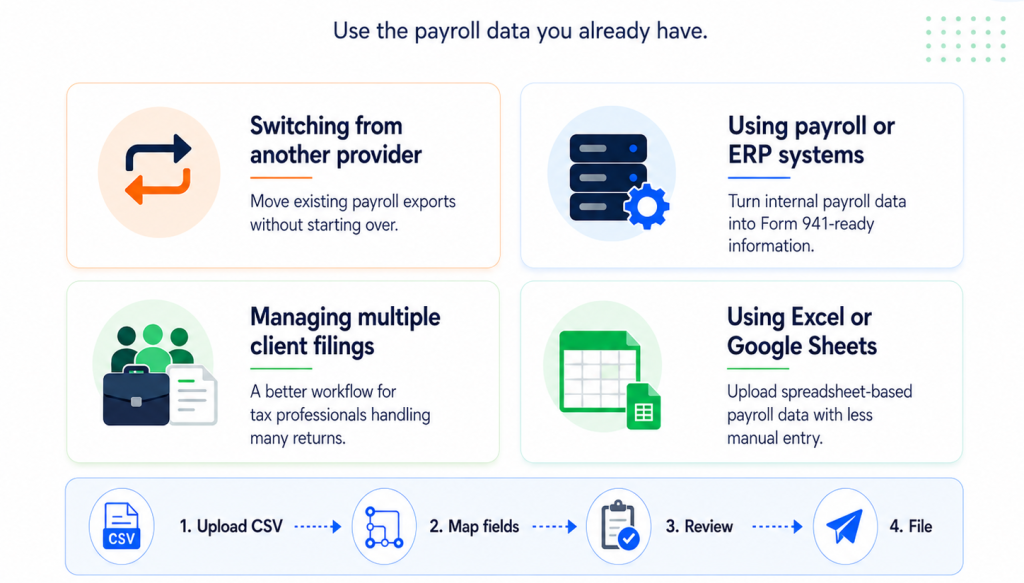
Businesses switching from another Form 941 provider
Moving to a new filing solution can feel difficult when your payroll data is already stored in another system.
With Smart Upload, you can export the data you already have and upload it into TaxBandits. This helps reduce the need to recreate records from scratch or manually transfer data into a new platform.
Employers using internal payroll or ERP systems
Many businesses use payroll, accounting, or ERP systems to manage wages, taxes, and deposits. However, not every system supports Form 941 e-filing.
Smart Upload helps employers export payroll data from their existing system and import it into TaxBandits for filing. This gives businesses more flexibility without requiring them to change how they manage payroll internally.
Tax professionals managing multiple clients
Tax professionals often receive payroll data from clients in different formats. One client may send an Excel export, another may send a payroll report, and another may provide data from an internal system.
Manually standardizing every file can take time.
With Smart Upload, tax professionals can upload client payroll data using CSV files and map the fields as needed. This helps make high-volume Form 941 preparation more manageable.
Businesses using Excel or Google Sheets
Some businesses still track payroll details through spreadsheets. That does not mean they should have to manually enter every value into a filing platform.
With Smart Upload, spreadsheet-based payroll data can be saved as a CSV file and uploaded into TaxBandits for Form 941 preparation.
How Smart Upload simplifies Form 941 preparation
Smart Upload is designed to make the filing workflow easier from the start.
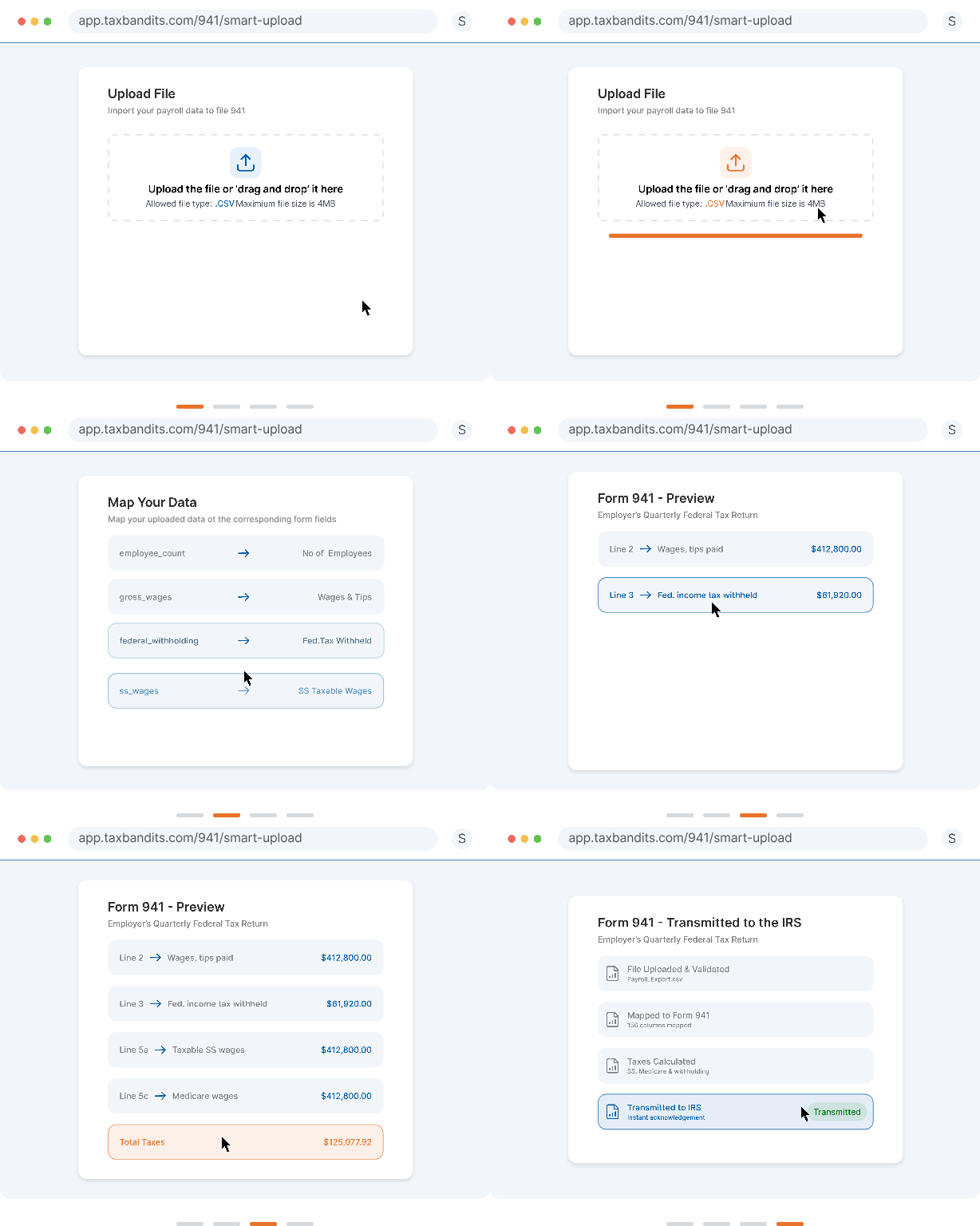
1. Upload your CSV file
Start by uploading the payroll file you already use. This could be an export from payroll software, an internal report, or a spreadsheet saved as a CSV file.
2. Map your columns to Form 941 fields
After uploading, match the columns in your file to the appropriate Form 941 fields. This helps TaxBandits understand where each data point belongs.
3. Validate the information
TaxBandits helps review the uploaded data and identify potential issues before filing. This reduces the risk of errors caused by manual entry or incorrect formatting.
4. Review and file
Once the data is mapped and validated, users can review the return and proceed with Form 941 filing.
A better way to move from payroll data to Form 941 filing
Smart Upload is built around a simple idea: businesses and tax professionals should be able to use the payroll data they already have.
Instead of spending extra time adjusting files to match a rigid template, users can upload their own CSV files, map the data, and continue the filing process with greater efficiency.
For businesses, this means less manual work. For tax professionals, it means a cleaner workflow when managing multiple clients. For payroll providers and firms, it means a more scalable way to handle quarterly Form 941 filing.
Use Smart Upload this 941 season and simplify the way you move from payroll data to filing.
Leave a Comment